Pages

May 1, 2017

Dark Patterns: The Ways Websites Trick Us Into Giving Up Our Privacy

Image: Wesson Wang/ Unsplash

Open up a web browser or power up a smartphone—pretty much essential for modern-day living—and you’re walking straight into a privacy minefield. That much you know. Especially after the news earlier this week that Unroll.me, a popular service that lets you unsubscribe from multiple email lists with a single click, was selling data it had mined from all your mail. What you might not realize is that your surrendering of your privacy isn’t just an accident—it’s the purposeful design of a particular breed of app makers and web designers employing a practice known as “dark patterns.”

What are Dark Patterns?

The practice of using interface design, social engineering, and other tricks to funnel users in a particular direction has come to be known as “dark patterns”, a concept even has its own website, complete with a hall of shame featuring some alarming examples.

“More sites seem to be making use of dark patterns than ever before.”

We’re talking about bonus purchases that appear by default in your shopping basket (a trick now illegal in the EU), confusing mixes of opt-in and opt-out check boxes when you sign up for services, and other forms of misdirection on the web and in apps. Before you know it, you’ve agreed to share your location for the next 40 years or upgraded your plane ticket on accident.

Advertisement

Advertisement

User Experience consultant Harry Brignull set up darkpatterns.org, and coined the phrase dark patterns itself, to try and highlight—and stop—this kind of sleight-of-hand.

“It started with one lone example—a low cost airline that was using a shady technique to trick users into buying insurance with their flights,” Brignull told Gizmodo. “I came up with this idea that by giving them a catchy name and publicizing them, it will help consumer awareness and deter companies from using them.”

The example that inspired the creation of Dark Patterns. You’re buying insurance here, not completing your booking. (Image: Dark Patterns)

Brignull points to two particularly pertinent types of dark pattern on the modern web: Friend Spam and Privacy Zuckering (yes, named after serial offender Facebook’s founder). You’ve probably come across both in the past.

Friend Spam

With Friend Spam, you’re asked to give access to your contacts list, ostensibly for your own benefit—to find friends you might know on a particular service. But what actually happens, most of the time, is your friends get spammed with invitations to join whatever new instant messenger you’re testing out.

You want a strong network, don’t you? (Image: Screenshot)

It’s an underhand tactic—and LinkedIn’s attempt at one version of it ending up costing it in the region of $13 million. You’ll find some version of it (often less aggressive) used by almost every social media company, including Facebook and Twitter. There’s no way to be sure if you’re about to bombard your contact list with spam beyond some light googling to see if the site you’re using is a serial offender. Or you could just avoid using the “find friends via email” service all together.

Privacy Zuckering

Privacy Zuckering covers all the ways companies try and get you to share more about yourself. Ever been invited to complete some extra boxes on your Facebook bio? Or contribute a bunch of unnecessary information when trying to get a free credit score online? Then you’ve been Zuckered.
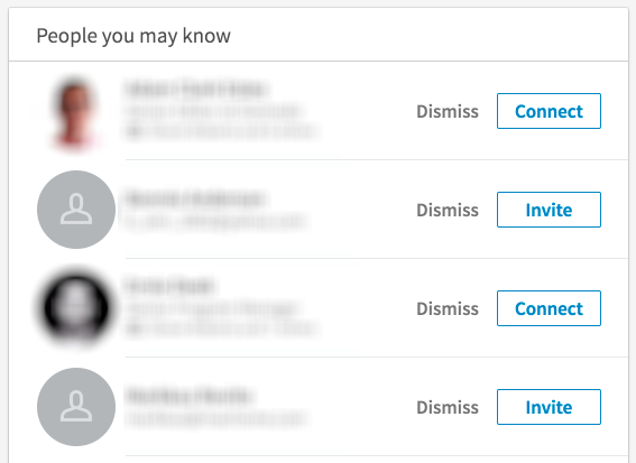
Are you connecting or are you inviting? (Image: Screenshot)

Privacy Zuckering is a little less egregious than it used to be. Consumers are growing more internet savvy. Which is why, according to Brignull, much of this practice has been moved behind the scenes, via terms and conditions you can’t avoid if you want to use a particular site or social network.

Avoiding dark patterns

There are plenty more examples (have a look at @darkpatterns)—making premium selections by default, or making it increasingly hard to opt out of services, or making very different options look too similar. Much of the time companies are relying on you to either not notice what’s going on or to be too busy to do anything about it.

Advertisement

Sponsored

According to Brignull the low cost airline that sparked his initiative has since mended its ways, but other companies have filled the gap.

“The dark patterns initiative has worked to some extent, but the web is a very big place,” says Brignull. “The situation has matured.”

“Once users become aware of a certain kind of trick, the sites start changing it out slightly so users don’t notice any more.”

The ethics of dark patterns aren’t always clear-cut either. Uber, for instance, would argue its app design makes more money for drivers and leads to a better service for passengers, even if you’re ordering the fanciest Uber when you’d prefer something cheaper. But other user experience (UX) design choices undoubtedly cross the line into straight-out deception.

Chris Nodder, a UX consultant and author of Evil by Design, says it’s difficult for users to stay ahead of the curve. “Once users become aware of a certain kind of trick, the sites start changing it out slightly so users don’t notice any more,” he told Gizmodo. “And more sites seem to be making use of dark patterns than ever before.”

“Maybe they think that because other sites are doing it, it’s okay for them to do it too.”

“The dark patterns initiative has worked to some extent, but the web is a very big place. The situation has matured.”

Nodder highlights the usual suspect as being particularly problematic: terms and conditions. In Evil by Design he quotes the example of a software company who hid a reward in their terms and conditions—it took four months and 3,000 downloads for someone to claim it.

Advertisement

Advertisement

“The T&Cs are presented at a time when you’re trying to complete a very different task,” he says “[They’re] a barrier between you and using the app, so it’s no wonder that people hit the big shiny ‘next’ button rather than reading through the whole thing.”

Users should also watch out for __apps and sites that try and collect information or permissions piecemeal, according to Nodder. These dark pattern attempts usually include some simple-sounding rationale for collecting the information—like __apps claiming to want location data to show you when your friends are around.

“If you saw one long form with all the personal data fields on it, you’d never fill it in,” says Nodder. “By the time you do realize, you’re typically so invested that it’s hard to quit.”

Advertisement

Both our experts suggest getting yourself educated about what you might be signing up for, and weighing up the benefits you’re getting in return. Sites like Dark Patterns and Terms of Service Didn’t Read can help, but no matter how sinister the tricks, the onus is still on all of us to clarify what we’re agreeing to. Ultimately, you might just be better using fewer apps and services in future.

Stay safe out there

How to Stay Safe on Public Wi-Fi

How Did Unroll.me Get Users to Allow It to Sell Their Inbox Data?
How to Spot a Link You Shouldn't Click On

April 28, 2017

Nougat arrives next week for the Galaxy S6 Edge Plus on T-Mobile

Android 7.0 Nougat has been out for a few months now, so we're getting to the point when older phones are seeing the update. T-Mobile project manager Des Smith reports that the Samsung Galaxy S6 Edge Plus is next up. This phone's Nougat update is on the way next week.

Here's the tweet from Des with the basics.

SOFTWARE UPDATE: @TMobile Engineers have approved the #GalaxyS6EdgePlus Nougat build! Should start pushing early next week!👏 pic.twitter.com/GPEadUQ26j

— Des 📱 (@askdes) April 28, 2017

Nougat on the GS6 Edge will be similar to other Samsung devices. There are some UI tweaks, better doze mode, standard Android split-screen apps, and so on. There's no firm launch date, but early next week is a safe bet. There's still no work on Nougat for the regular Galaxy S6 on T-Mobile, though.

Amazon is ending its Underground 'Actually Free' app program [Update]

  • Update 1: 2017/04/28 7:29pm PDT
    Details from Amazon

Amazon's Appstore for Android has always been at a disadvantage compared to the Play Store. It isn't included on devices other than its own Fire tablets, and the Play Store has a lot more content. Amazon has tried to entice users to get __apps from the Appstore with various promotions and free apps. Back in 2015, Amazon launched the Actually Free program, which offered paid __apps and games at no cost. Today, Amazon has announced it's discontinuing Underground Actually Free.

The shutdown will come in several phases. beginning on May 31st, developers will no longer be able to submit apps for inclusion in the Actually Free program. Those that are already in will continue to generate payments based on the amount of time people use them. Devs can keep publishing updates to the Actually Free apps through the end of 2019 when the program shuts down completely. However, there won't be as many people to use them pretty soon.

Android devices other than Fire tablets will lose access to Underground Actually Free apps this summer, but anything previously downloaded will continue working until the end of 2019. Owners of Amazon's Fire tablets can continue to download and use Actually Free apps and games until the end of 2019. That means owners can download, uninstall, and reinstall those apps without losing access to the free content... for a while.

We've reached out to Amazon to see if there are any changes to the regular Appstore program. Maybe the return of free app of the day? There's little reason to start using Amazon's Appstore without some sort of freebie.

Update 1: 2017/04/28 7:29pm PDT

Details from Amazon

Amazon tells us that the Appstore will continue operating normally going forward. Developers will be able to set prices for their apps or take advantage of other free programs like FreeTime Unlimited for kids. There's no word on the free app of the day coming back. Fingers crossed, though.

End of Update
  • Source:
  • Amazon

[Update: G6 and Watch Style for $650] Pre-orders for the unlocked LG G6 are live on B&H for $599.99

  • Update 1: 2017/04/28 12:20pm PDT
    Watch Style

The LG G6 is a big step up for LG after the mess that was the G5. It's a good phone, and you can get if from your carrier right now. However, what if you don't want the carrier version? Well, LG is launching an unlocked North American variant in a few weeks. B&H is accepting pre-orders now, and they've knocked $100 off the price.

The unlocked LG G6 (model LGUS997) is essentially the same phone you can get from carriers, but it works on any GSM or CDMA network. It also has a ton of LTE bands (1, 2, 3, 4, 5, 7, 12, 13, 17, 20, 25) that should cover most networks. It runs the on same Snapdragon 821 and 4GB of RAM as the carrier versions. The software is also still just 7.0 rather than 7.1.

The phone comes in either silver or black (the black looks better), and the MSRP is $700. B&H is only asking $599.99 if you pre-order the phone now. There's no firm launch date, but the phone is expected to ship out around the middle of May.

Update 1: 2017/04/28 12:20pm PDT

Watch Style

B&H also has a deal for an unlocked G6 with a Watch Style for $649.99. You basically get the watch for $50, which usually costs $250 by itself. You can get the bundle with a gold, black, or silver watch.

End of Update
  • Source:
  • G6 in black,
  •  G6 in silver

Google posted more of the 2017 I/O schedule, time to plan your own

More of this year's schedule for Google's I/O developer conference is finally up. At least, more than the last time we talked about it. Not all of the events are on it, as some would likely give away announcements made during the keynote at I/O by their presence on the calendar, but it looks like most of the talks should be there now. If you are planning on attending, as some of us are, then you might want to start figuring out how best to divide up your time.

Some of the time slots have 12 different events, so the odds are very likely that you won't be able to make every single talk you want. Things kick off May 17th with a breakfast before the Keynote at 10AM. The developer keynote follows that at 1PM after a break for lunch, though there are some talks available during lunch if the subjects appeal to you, or the food doesn't. For the rest of that day and the other two, though, you're on your own to find out what you'd like to attend. Remember that some of the talks will require that you reserve a seat. The schedule will continue to be updated as we get closer to the event.

Those of us who may not be there should still take a look, as Google also streams some of the other events and sessions at I/O. That means even if you weren't able to make it to the event, you can still get your developer thing on. The talks that will be streamed are marked on the schedule with a little camera icon, still leaving you with entirely too many choices. If you end up with a scheduling conflict you can always go back and watch some of the old recordings. With that, you might want to prioritize to attend things that aren't being recorded, like the "Office Hours," if you have any unwanted overlap.

mapextended

Another option for those that can't attend are the I/O Extended events. Feel free to check and see if any are being hosted near you. I'll probably be attending the show this way, myself.

The official I/O app hasn't been updated for 2017 yet, but feel free to pull it down in anticipation via the attractive widget below, or over at APKMirror. Google has a pretty nice set of tools put together, both in the app and online, for managing your I/O schedule. With the wide selection of talks and events, it's a really good idea to use them. For the full details, to plan your schedule, or to just lament not going, feel free to check out the source link below.

Google I/O 2016
Google I/O 2016
Download QR-Code
Google I/O 2016
Developer: Google Inc.
Price: Free
  • Source:
  • Google(1,
  • 2)