Pages

January 30, 2017

How To Get All Your Fitness Tracking Data in One Place

Image: Fitbit

You’ve got data pouring in from your connected fitness tracker, your smartphone, your smartwatch, the smart scales in your bathroom and the dieting app you use to log your meals—so how do you get all of this information in one place? It isn’t easy, but here are a few pointers to help.

Advertisement

Fortunately for those looking to consolidate their health and fitness data, most of these services have APIs, so there are options for pooling stats from different devices and apps. It’s what Google and Apple have been trying to do with their own health and fitness portals, though with a limited amount of success so far.

Using Google Fit

Image: Google

Google Fit now comes as standard on Nexus and Pixel devices, using the sensors packed into your phone (or Android Wear watch) to keep track of steps, sleep, and other measurements automatically.

Advertisement

As you would expect from Google, it’s slick and available on the web, but we’re yet seeing much in the way of support from non-Google devices, even though Google Fit was first announced way back in summer 2014.

Image: Screenshot

There are a decent number of __apps that work with Fit: Strava, Sleep As Android, and Runtastic, for example, so if you use these __apps to track your running, walking, sleeping, and workouts then Google Fit is a decent option for consolidating everything in one place. What’s missing is direct compatibility with the major wearable makers, the likes of Fitbit and Misfit, though Withings devices are supported.

Compatible apps (here’s a list) are usually connected from within each individual app’s settings, so you’ll need to dig around to find the option. From within the Google Fit app on Android, choose Settings from the menu then tap Apps connected to see what’s piping data into Google Fit.

Using Apple Health

Image: Apple

It’s a similar story with Apple Health as it is for Google Fit—strong integration with Apple’s own kit and support for some big-name apps, but more limited compatibility with actual devices you might be wearing on your body (unless it’s the Apple Watch).

Advertisement

Sponsored

Health is much broader in scope than Fit, acting as a repository for all of your medical data, not just the number laps your ran this morning. It also goes into greater depth when analyzing your progress and making recommendations about where you can improve (like when to stop and take a breath).

Image: Screenshot

There’s no easy way of checking which apps work with Apple Health and which don’t, but as with Google Fit, Strava and Runtastic have joined the party, and Health links to apps from Misfit, Withings and Garmin too, so you can in theory use any of their wearables and pipe data through the default apps then on to Apple Health. Fitbit is the big hold-out.

Advertisement

As with Google Fit, access is granted to Apple Health through the individual apps. Tap the Sources link on the front page of the Health app to see what you’ve linked up and adjust which variables each of the apps is allowed to edit.

Using IFTTT

Image: Screenshot

We’re unashamed fans of IFTTT (If This Then That), and the service plugs into just about every fitness tracking API out there including Fitbit, Jawbone, Withings, Misfit, Strava and more. This makes it even broader in scope than the offerings from Google and Apple. It’s a shame then that IFTTT doesn’t work with Google Fit or Apple Health directly.

IFTTT isn’t a repository for your data either, so once you’ve collected all the information from your various trackers and apps, you need to put it somewhere else. Fortunately, there are lots of options to pick from.

You can pipe your statistics out to Evernote, for example, or a Google Drive spreadsheet, or OneNote, or even a blog post if you want the world to know what you’re up to. A bit of trial and error might be required to get the data in the shape you need, but you’ve got plenty of scope for collecting and analyzing feedback from multiple apps and devices.

Advertisement

Advertisement

If you want to log your daily Fitbit stats to a Google Drive sheet, for example, choose Fitbit then Daily activity summary as your trigger, then Google Drive and Add row to a spreadsheet as your action. With a bit of touching up on the sheet itself, you can get a very decent-looking record of your exercise and sleep. Then you can import information from the spreadsheet into various apps.

Using Exist

We may well have saved the best until last. Exist draws in a ton of data from a range of fitness apps and devices, and will even go to the trouble of analyzing it for you, letting you know which days you’re most productive, and even how the weather affects your exercise.

Exist works with Fitbit, Jawbone, Misfit, Withings, Google Fit, Apple Health (and the Apple Watch), Strava, Moves, Runkeeper and more besides. It can also pull in data from the likes of Last.fm, Spotify, Twitter, Dark Sky and RescueTime to try and chart your exercise against other factors like social media activity and how much music you’re listening to.

A subscription to Exist will set you back $6 a month but there is a 30-day free trial available so you can work out whether it’s for you. Once you’ve got yourself up and running, you can connect various services with just a few clicks.

Advertisement

The online interface is a breeze to use and lets you dig into your stats in great detail, letting you chart different variables against each other. It also tries to pick out trends for you, letting you know everything from which music artist gets you exercising more to how your tweet patterns boost your step count.

January 29, 2017

[Update: Better shots] Google's LG-built Android Wear 2.0 watches appear to have leaked in low-res form

  • Update 1: 2017/01/27 9:06pm PST
    Famed leaker @evleaks has published pictures of the smaller LG Watch Style in both silver and rose gold colors. They reveal the previously-mentioned silver variant of the Style and confirm its

We're just a few weeks away from the release of Android Wear 2.0, and along with that we expect Google's new watches to arrive. Google has confirmed it's working on these devices, but little else. Following a spec-heavy report last week from VentureBeat, there's now a new piece of the puzzle. An image has leaked that purports to show the two watches, and they look very much like we'd expect them to look.

The image is clearly scaled up from a much smaller one, so the watches are grainy and don't have much detail. The smaller of the two (the LG Watch Style) appears to use standard lugs and has a somewhat feminine appearance. The pronounced crown button could be large enough to act as a digital crown, as we heard in that last leak. The same is true of the larger LG Watch Sport. This one has three buttons with the larger one in the middle. The lugs are heavier here and might require a non-standard band. They're a good match for our renders.

The Style is said to have a 1.2-inch display, while the Sport will be 1.38-inches. The Sport also has NFC, cellular data, and IP68. The Style is only IP67. Last we heard, the official unveiling would be on February 9th.

Update 1: 2017/01/27 9:06pm PST

Famed leaker @evleaks has published pictures of the smaller LG Watch Style in both silver and rose gold colors. They reveal the previously-mentioned silver variant of the Style and confirm its model number of LG-W270.

LG Watch Style, in silver (top) and rose gold (bottom) pic.twitter.com/JlHaq35bZ0

— Evan Blass (@evleaks) January 28, 2017

End of Update
  • Source:
  • TechnoBuffalo

eBay is a service with a huge amount of different options and things to do - search, buy, sell, add to watch list, message a seller, etc - so the new 5.6.0.14 update, adding app shortcuts, is very useful indeed.

Very app shortcuts. Much quick.

The four app shortcuts consist of Following, Selling, Watching, and Search, which is presumably what market research told eBay most people do while using the app. It's a good move, because it means those who buy a lot can add to their watch list or search from the homescreen, while sellers can go directly to selling. Also related is a round icon for the Pixel Launcher - see the main image (or the comments) for an example.

WHAT'S NEW

Here are some of the top improvements based on your feedback:

  • Fixed: Notifications would sometimes open to an older message or item.
  • Fixed: App would sometimes restart after putting it in the background. (you might need to re-add your eBay shortcut from the app drawer)
  • Quick Tip: Save your search filter options by tapping the lock icon in the filter menu

No filter lock to be found. :sadface:

The only other new thing, beside bug fixes, is a lock for filters during search. However, when I looked for this, it was nowhere to be seen. If you're seeing it, or I'm just blind, let rip in the comments. Otherwise, the app is available on Google Play, or at APK Mirror if you prefer.

eBay - Buy, Sell & Save Money (Playboard) | eBay - Buy, Sell & Save Money (Play Store)
  • Thanks:
  • +Aaron Prasad

Some Johto region (Gen 2) Pokémon will start to appear in Pokémon GO very soon

The rapid success of Pokemon GO was one for the history books. Immediately following release, it not only became the dominant game on both iOS and Android, it was a sensation that seemingly everyone played. But, like almost every smartphone game, it lost most of its steam after a month or two.

Pokémon GO's audience has diminished, but still retains a following with dedicated fans. It was previously announced in December that some Pokémon from the Johto region (the region that Pokémon Gold and Silver take place in) would become available through eggs. Players will soon be able to find some Johto Pokémon in the wild without the hassle of hatching eggs.

The announcement comes from the official Pokémon Trainer Club Newsletter, for some reason (I'm glad I kept forgetting to unsubscribe). The newsletter says the new Pokémon will start appearing today, but given that there has been no other announcement, the message may have been sent out early.

While it did not state which creatures would be available in the wild, both Pichu and Togepi are visible in the image. Cleffa, Igglybuff, Pichu, Togepi, Elekid, Magby, and Smoochum can already hatch from eggs in Pokémon GO, so I would bet these can now be found in the wild as well.

Let us know in the comments if you can manage to catch one. Or feel free to vent your frustration about how Niantic blocked your phone from playing.

  • Source:
  • Pokemon Newsletter (PDF mirror)

January 26, 2017

Type Nine Keyboard – Swipe & Tap with T9

Type Nine Keyboard

Type Nine Keyboard – The ultimate typing experience

Swiping:
Type Nine is the first keyboard ever to combine a keypad layout with swiping. Typing by swiping is a seamless experience and once you’ve picked up the movements, you will type faster and more effortlessly than ever before.

Multiple languages at the same time:
Type Nine suggests words from multiple languages at the same time. No need to switch keyboard to type in a different Language.

VoiceOver:
If you’re using VoiceOver, Type Nine will be a pleasant improvement to your daily typing.

Remembers your words:
If a word is not in the dictionary you can type it manually with ease, and Type Nine will remember it for you. Every time you write a word, Type Nine will adjust its behavior so that the most used word is suggested first.

Easy to follow tutorials:
Getting started with Type Nine is easy. Everything is put together in an intuitive manner, and if you want to start using all the efficient hidden gems, there are tutorials to explain how to do that.

Themes:
Type Nine features a handful of different themes to suit your mood or taste.

Emojis:
All the iOS emojis with easy access. Your most used smileys are easily accessed by a single swipe.

Delete so sweet:
The backspace button in Type Nine is nothing short of a miracle. By swiping left you can delete an entire word, but by swiping slowly you can precision delete much better than simply holding down backspace. You can even undo what you deleted or cut it to a different position by swiping down on delete.

Moving the cursor:
No more cramps in your fingers trying to move the cursor to the correct position. Simply swipe left or right on space to move the cursor an entire word at a time, or swipe slowly to position precisely.

Resizing for big screens:
If you’re using an iPhone 6 plus or an iPad, you can easily resize the keyboard to a better size for one-handed typing.

Download Type Nine on the App Store
Visit Developers Website

January 24, 2017

Review: Microsoft Surface Book with Performance Base

Microsoft Surface Book with Performance Base Review

The Surface Book was a milestone product for Microsoft. This laptop/tablet hybrid that they don’t actually call a tablet, changed the way people thought about creating on a Microsoft device. From the interesting hinge to the detachable display, the 2-in-1 computer just begs to be paid attention to.

At first launch, I didn’t give it much consideration. It simply was not powerful enough for my daily needs. When Microsoft decided to upgrade the device with the performance base, I thought, maybe it’s time to give it a try.

I edit a lot of photos and video on my laptop and keep a lot of tasks running at the same time. Will this device be able to handle my workload and my workflow? I attempt to answer that question in my video review of the Microsoft Surface Book with Performance Base.

Microsoft Surface Book with Performance Base: http://amzn.to/2j7zjHp

Using Lightroom on the Surface Book via Ditch Auto: https://youtu.be/53t-YeheBU4

MarginNote Pro – Efficiently Study PDF & EPUB Books

MarginNote Pro App

Welcome to MarginNote. This is a highly powerful reading and study software and is applicable to Mac, iPad, and iPhone. By integrating the PDF/EPUB reader and multiple powerful study tools, MarginNote will enable learners to reorganize and connect knowledge from different aspects, then memorize and grasp it accordingly.

Whatever your profession, such as student, educator, researcher, lawyer, or a life-long learner, you may annotate and take notes through MarginNote, organize notes via Mindmap and Outline, connect knowledge horizontally via Hashtag and raise memory effect via the Flashcards.

You will discover what MarginNote does is not to simply integrate these tools. Instead, it combines them deeply and skillfully, which makes it easier for users to toggle between different tools.

MarginNote FEATURES

Reading:

  • Support PDF and EPUB format
  • Show book notes and links at page margin
  • Converting Web page into EPUB via Safari or embedded web browser
  • Support adding many books (materials) into one notebook

Annotating and NoteTaking:

  • Support text highlight and rectangular highlight
  • Sketch on book page directly for highlight
  • Add notes directly at the page margin; the note editing area will not overlap with the book content at all
  • Text, voice, picture, sketching and many other forms of comments in note
  • Add hashtags to notes to facilitate the connection of notes

Outline and Mindmap:

  • Outline and Mindmap in one view
  • Create Outline tree by swipe gestures
  • Multi-selection editing such as group, merge, clone, etc
  • Quick searching and filtering according to colors, hashtags, books

Flashcard:

  • Highlights and notes can be automatically turned into flashcards for review
  • Spaced repetition adopting the Anki-based algorithm
  • Switch to the linking book page at any time
  • Simply sketch on the page highlight to serve as the question of the flashcard
  • Text to speech for flashcards

iPad Pro & Apple pencil:

  • Split View of multiple tasks
  • High-precision drawing by Apple pencil
  • MarginNote has been fine tuned for Apple pencil. With intuitive design, user can scroll page by one finger and draw by pencil
  • Optimize the keyboard operations to a great extent. The shortcuts combination such as “TAB+ENTER” leads to efficient input during writing

Import, Export, and Sync:

  • Import web pages and notes from Evernote
  • Export flashcards to Anki
  • Export Outline to OmniOutliner
  • Export Mindmap to iThoughts or MindManager
  • Export to Evernote
  • Export all the margin notes, MindManager, Outline and related PDF/EPUB to a printable PDF
  • Sync books¬es with iCloud

IT’S ABOUT STREAMLINING AND ENERGIZING YOUR NOTE TAKING PROCESS
MarginNote is the only note-taking app you’ll ever need! Staying organized, engaged, and in control just got really simple and effective: MarginNote!

Feel free to drop us a line! We’re always listening to your suggestions to improve MarginNote! If you have any issues with the app, just contact us and we will help you!

Download MarginNote Pro on the App Store
Visit Developers Website

January 20, 2017

Android Pay v1.13 prepares to support PayPal cards and enable payments with Visa Checkout [APK Teardown]

Article Contents

  • 1 What's New
  • 2 Teardown
    • 2.1 PayPal support
    • 2.2 code
    • 2.3 Visa Checkout
  • 3 Download

A new version of Android Pay is headed out to users. Like many other updates, this one doesn't seem to have much in the way of new features poking out from the surface of the app. However, a teardown of the APK gives us a couple of things to look forward to in the near future. Android Pay will soon enable the use of PayPal cards and it looks like we're getting close to the previously announced support of Visa Checkout. If you'd like to pick up the latest version ahead of the regular rollout schedule, hit the link at the bottom of the page.

What's New

2017-01-20 19.24.372017-01-20 21.07.25

It's a very small thing, but I thought I'd point it out for kicks. The "Show advanced" button in Settings has been renamed to "Show stores." The label never made a lick of sense before, so this is at least a logical change. There's no functional change, tapping on the label still reveals a list of stores with toggles so they can be turned off individually.

That's all we've seen for changes, but there may be a couple others buried in odd places. Let us know in the comments if anything else pops up.

Teardown

Disclaimer: Teardowns are based on evidence found inside of apks (Android's application package) and are necessarily speculative and usually based on incomplete information. It's possible that the guesses made here are totally and completely wrong. Even when predictions are correct, there is always a chance that plans could change or may be canceled entirely. Much like rumors, nothing is certain until it's officially announced and released.

The features discussed below are probably not live yet, or may only be live for a small percentage of users. Unless stated otherwise, don't expect to see these features if you install the apk.

PayPal support

Android Pay has been making pretty good progress with supporting new banks, card types, and even a few countries, but there's still a long way to go and some very popular names are still missing from the list. Now it looks like one of the Internet's best-known names in payments will be joining the ranks soon: PayPal.

Historically, PayPal has had to go through some slightly unusual measures to have its cards accepted at brick & mortar locations. Most notably was a deal established with Discover back in 2012 that allowed transactions with PayPal cards to be routed over Discover's network. In a more recent deal, announced just 9 days ago, PayPal and Discover are building on their prior work to allow Discover cards to be accepted at PayPal terminals – basically returning the favor from the original deal. The other component of the agreement gives PayPal access to Discover's token service, which means it will allow PayPal users to use contactless terminals that support Discover.

Now to the important part. Android Pay will begin supporting PayPal, and Discover will be generating the virtual account numbers to make it work. I know, quite the lead-up for such a simple result, but it all goes into explaining the strings below.

code

<string name="account_number_explanation_no_last_digits_paypal">A virtual Discover account was used to make this purchase</string>
<string name="account_number_explanation_paypal">A virtual %1$s account ending in %2$s was used to make this purchase</string>
<string name="account_number_refund_explanation_no_last_digits_paypal">A virtual Discover account was used to issue this refund</string>
<string name="account_number_refund_explanation_paypal">A virtual %1$s account ending in %2$s was used to issue this refund</string>
<string name="pending_transactions_disclaimer_paypal">For some merchants, you may see a temporary hold higher than what you'll be charged. Check your account statement for the final amount. %1$s</string>

As you can see, the string names all mention PayPal, but most of the on-screen content mentions Discover. That's why the explanation above was necessary. Naturally, contactless terminals will still have to support Discover in order to use a PayPal card, even with Android Pay as a part of the equation.

I'm not familiar enough with PayPal's card offerings to be sure, but it looks like there may have been at least 2-3 different cards available. The only safe bet is that if a card would have previously worked wherever Discover was accepted, it should continue to work with Android Pay. I believe that covers every card I can find, with the possible exception of the PayPal Access Card, which may or may not be supported.

It seems that even if Bancorp (the provider of PayPal's cards) is dragging its heels joining the roster of Android Pay banks, PayPal is happy to look for another way around, and I doubt that's going to bother any of its cardholders.

Visa Checkout

Let's switch gears to another Internet payment system: Visa Checkout. If you're not already familiar with it, this is Visa's secure online system for making payments without providing a card number directly to websites. Basically, it's a competitor to the part of PayPal most people actually want to use.

Readers may remember Google announced a partnership with Visa Checkout and MasterPass back in October, promising that the two services would be operational in early 2017. Only about three weeks in and it looks like things are underway... At least for Visa Checkout, that is. There's no sign of MasterPass yet.

<string name="virtual_account_number_explanation_vco">This number was issued by %1$s. It’s used when you make purchases with Visa Checkout in Android Pay.</string>
<string name="virtual_account_number_vco">Virtual account</string>

Android Pay and Visa Checkout together might seem a little redundant since they're both primarily intended to get away from using raw credit card numbers and use single-use payment tokens, but the announcement points out that they will benefit from each other. Basically, Visa Checkout will be responsible for the payments while Android Pay provides personal information (if necessary) and device security.

Download

The APK is signed by Google and upgrades your existing app. The cryptographic signature guarantees that the file is safe to install and was not tampered with in any way. Rather than wait for Google to push this download to your devices, which can take days, download and install it just like any other APK.

Version: 1.13.144762007

  • APK Mirror
Android Pay (Playboard) | Android Pay (Play Store)

Google acknowledges data count bug with OnHub/Google WiFi mesh networks

Modern routers can do some cool things, especially if you're using the new Google WiFi mesh routers. They can cover your home in a healthy glow of electromagnetic waves, intelligently connect to devices, and keep track of your data usage. However, linking Google WiFi with an OnHub can result in some weird data usage stats. Google now says it's aware of the issue and is working on a fix.

Our fearless leader encountered this issue some weeks ago, and posted some details on Google+. The gist is that the Google WiFi app is somehow miscounting some of the data traffic in these mixed networks. Artem saw over 4TB of usage (which did not add up to the displayed total) during a period in which his ISP only reported 1.4TB. It's in the ISP's interest to know these things. So, it's probably the total that's right and not the individual device counts.

We reached out to Google, and have now gotten an official response.

After speaking with a specialist it looks like this is a known issue and we are currently working on a fix. Once this has been resolved, we will reach out to you via email with more details on the resolution.

So, there should be an update to Google WiFi, the OnHub, or both that will fix this issue. Google didn't provide a timeline, though.

  • Source:
  • +Artem Russakovskii

Meitu claims it's collecting user data because it's in China and needs to do ad tracking

The anime-styling selfie app Meitu has exploded in popularity recently, then someone got to wondering why it was asking for so many permissions. It turns out the app is grabbing your IMEI and MAC address and sending them to a server in China. People were understandably concerned, and now Meitu has issued a statement meant to assuage our fears. It kind of doesn't, though.

The statement provided to Cnet notes that Meitu is based in China, which we knew. However, this means it cannot use the anonymized user tracking in the Play Store (this part makes sense). Therefore, it's using IMEI/MAC as a unique identifier. This ID is used to track user data and ad placement. It goes on to talk about how secure its servers are, saying, "...the data collected is sent securely, using multilayer encryption to servers equipped with advanced firewall, IDS and IPS protection to block external attacks."

So, that's an explanation, but I don't think it's necessarily a good one. It doesn't explain why Meitu would use this data when it could generate unique IDs in other ways. The effort to point out how secure its servers are seems weird too. Sure, they have identifying data about you, but it's really safe. Okay.

It seems more likely this has something to do with new Chinese regulations that require app developers to be able to track data back to an individual user. I guess what we can take from this is that Meitu probably isn't selling your data, but it's not being upfront about why it has your data in the first place.

  • Source:
  • Cnet

Truck Simulator USA

Want to know what driving an 18 Wheeler feels like? Truck Simulator USA offers a real trucking experience that will let you explore amazing locations.

This American Truck Simulator features many semi truck brands, with realistic engine sounds and detailed interiors! Drive across America, transport cool stuff such as vehicles, gasoline, gravel, food, and much more… Become a professional truck driver and enjoy the career and the online multiplayer mode!

Drive Across American, play Truck Simulator USA!

Features:

  • Many American Truck brands
  • USA, Canada, and Mexico
  • Different climate locations: desert, snow, mountain, city
  • Improved Controls (tilt steering, buttons or virtual steering wheel)
  • Manual Transmission with H-Shifter and Clutch
  • Realistic Engine Sounds (V8, Cummins, etc..)
  • Lots of trailers to transport
  • Multiplayer Mode and Career Mode
  • Visual and mechanical damage on vehicles
  • New weather system (snow, rain, sun…)
  • Request new trucks or features on our Social Pages!

Download Truck Simulator USA on the App Store
Visit Developers Website

Maximize Your Refund With Amazon's TurboTax Discounts

TurboTax Discounts

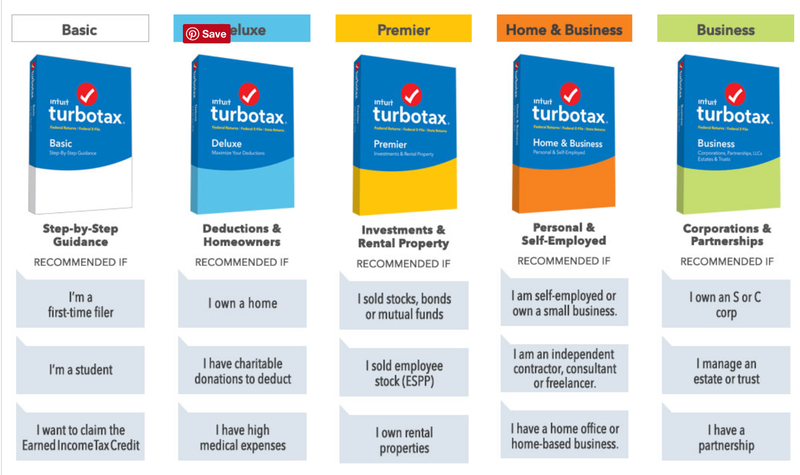
Tax forms are finally starting to roll out, but before you go out and pay full price for filing software, be sure to check out Amazon’s TurboTax discounts.

Advertisement

This page has a handy comparison chart to help you choose the right version for you. And once you’ve decided, you’ll get your choice of a download or a disc. Eagle-eyed deal hunters might note that the prices listed on TurboTax’s site are the same or slightly lower, but those online versions will charge you an additional $37 for state tax software. The downloads and discs that Amazon’s selling by comparison include a free state download, along with free form printing, or a $20 e-file fee.

More Deals

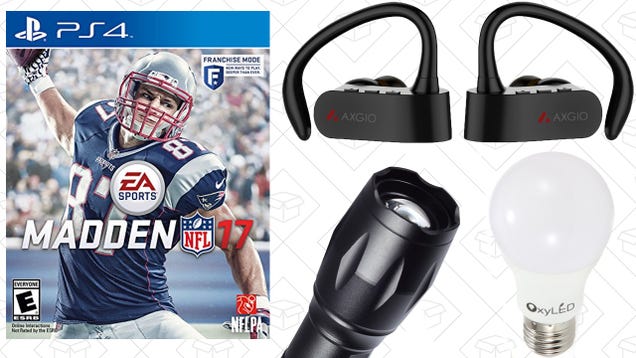
Today's Best Deals: Madden 17, True Wireless Headphones, TurboTax, and More Today's Best Deals: Madden 17, True Wireless Headphones, TurboTax, and More Today's Best Deals: Madden 17, True Wireless…

Madden 17, truly wireless headphones, and a $2 LED bulbs lead off Friday’s best deals. Read more Read more


January 18, 2017

Your Smartphone Becomes the Grillmaster With This New Wi-fi BBQ

Some cooks pride themselves on their mastery of the grill and are happy to spend hours tending to meats. However, if you love barbecue but hate the idea of being stuck next to one all afternoon, Char-Broil’s new SmartChef gas grill connects to a smartphone app so you can monitor your dinner while doing anything else.

As barbecues go, the SmartChef TRU-Infrared Gas Grill sounds like it has most of the bells and whistles that even an experienced grill-master could need, including stainless steel burners, a sideburner for pots and pans, porcelain coated grates for easy cleaning, and even glowing LED knobs so you can keep on grilling into the night.

Advertisement

But this $800 grill might actually be more appealing to barbecue amateurs who haven’t quite developed the obsession needed to tend to a rack of ribs for hours, or who don’t know how to give a steak the TLC it deserves. Using built-in sensors and temperature probes that can be inserted into various foods, the SmartChef grill connects to your home’s wi-fi network so that it can talk to an accompanying iOS app and provide continuous feedback on how dinner is coming along.

The SmartChef app can provide updates and notifications on grill temperature, when it’s time to flip a steak, when it’s time to take food off the grill, an estimation of how much time is left, and even other status updates like warnings when the propane tank gets too low.

Advertisement

As someone gets more comfortable with grilling, the SmartChef TRU-Infrared Gas Grill has different modes that start off by walking an amateur through every last step for a specific dish they’ve selected and include more advanced modes that simply provide details on the grill’s status from afar so you can instead spend time socializing with the guests you invited to your barbecue, and not the barbecue itself.

Do you really need to spend $800 on a barbecue just because it’s joined the smart appliance club? The answer is probably no for casual grillers who aren’t perfecting their rib recipe every weekend. And the wi-fi hardware on the SmartChef grill isn’t powered by propane, so you’ll need to make sure you have a place to plug it in outside, which could be inconvenient. But if you’re obsessed with something like brisket, which takes even longer than a few hours, a wi-fi enabled grill might finally give you your life back.

Update, 2:37 p.m. EST/EDT: A Char-Broil representative has reached out asking to point out that the SmartChef grill’s accompanying app also allows users to remotely monitor, and adjust, the cooking temperature to ensure nothing gets overly charred or too well-done.

Sponsored

[Char-Broil]

January 12, 2017

ZTE updates Axon 7 Mini with T-Mobile VoLTE, December security patches, and more

There's an update rolling out to the Axon 7 Mini today that will be of particular note to anyone using the phone on T-Mobile. This device is finally getting support for T-Mobile's VoLTE calling. There are a few other tweaks and improvements, but that depends on the version of the device you have. And no, it's not Nougat.

The new software build is B21. Your Axon 7 Mini could be on one of three different builds prior to the update: B12, B14MR2, or B16. If you're in the US, it's probably on B12. That version of the device gets the following in B21.

  • Support T-Mobile HD Voice call (VoLTE). (Can be enabled via Settings->All Settings->More->VOLTE Voicecall)
  • Google security patches updated through December
  • New APN added to match all major North American carriers
  • Google Applications updated
  • Enhanced and optimized camera focus speed and night mode
  • Other general enhancements

Those with B14MR2 or B16 will get a less extensive update with the following.

  • Google security patches updated through December
  • New APN added to match all major North American carriers
  • Other general enhancements

The larger B21 update has a total size of 419MB and is available from the update menu right now. Just head into your settings to grab it.

YouTube Super Chat allows users to pay to get more exposure in live comment streams

YouTube live streams are generally pretty good, but getting noticed in the live comment stream is tricky, especially when they're thousands or even hundreds of thousands watching or commenting. To combat this, YouTube has introduced Super Chat, a way for commenters to get more noticed by their favorite content creators by paying to pin comments to the top.

The way SuperChat works is by allowing individual users to pay to promote their comment for a temporary period of time (up to 5 hours). The comment is highlighted and pinned to the top of the comments, and the creator who is hosting the live stream can reply. To send a Super Chat, send a dollar sign in the live chat, then select 'Send a Super Chat'. Drag the slider to the desired value - more money means more/longer exposure, plus different colors the more you pay - or enter a value. You then then enter your message - which is character limited depending on how much you pay - and press buy. The message will send, and your Super Chat will be promoted for whatever length of time you purchased, with a timer on it saying how much time remains. It's similar to Twitch Cheers, which allows a user to purchase 'bits', which are then used to purchase cheers, affording them more exposure in comments.

Of course, this has another, ulterior motive: adding in another revenue stream for the live streamer. This is a good thing, especially when many don't feel they get enough from ads anyway, and Fan Funding is going away as well. But what I don't like is the extra attention this gives people, exacerbating the whole 'look at me' culture which is rife on the internet. Anyhow, Super Chat is in beta for the moment, with YouTubers such as iHasCupquake, buzzbean11, and Alex Wassabi. It'll be launched widely on January 31 for creators in 20 countries and viewers in more than 40.

  • Source:
  • YouTube Creator blog,
  • YouTube support

Android Pay gets support for 40 new banks including BMO Harris

Every time it seems like Android Pay must now, finally support all the banks, there are more of them. Google has just confirmed support for 40 more banks in its payment service. That's in addition to the 46 that were added just a few weeks ago. Let me just save you the trouble of scanning the list and being disappointed—Simple Bank is not among them.

Here's the list of new banks and credit unions.

  1. Advantage One Federal Credit Union
  2. Bank of Central Florida
  3. BMO Harris Bank N.A.
  4. Central One FCU
  5. Century Bank
  6. Citizens National Bank of Greater St. Louis
  7. Community CU
  8. Educators CU
  9. FedEx Employees Credit Association
  10. First Credit Union
  11. Hanscom Federal Credit Union
  12. Heritage South CU
  13. Institution for Savings
  14. Jefferson Financial Federal Credit Union
  15. L&N Federal Credit Union
  16. Lake County Educational Federal Credit Union
  17. Merchants and Marine Bank
  18. Meridian Trust FCU
  19. Morgantown Bank & Trust
  20. National JACL CU
  21. Origin Bank
  22. Oxford Bank & Trust
  23. Palmetto Citizens Federal Credit Union
  24. Patriot Bank, N.A.
  25. Sacramento Credit Union
  26. SECU of Maryland, Inc.
  27. St. Mary's Credit Union
  28. State Bank of Cross Plains
  29. Sun Federal Credit Union
  30. Teachers Credit Union
  31. The Camden National Bank
  32. The Independence Bank
  33. TMG Financial Services
  34. TruPoint Bank
  35. UniBank For Savings
  36. Utah First Federal Credit Union
  37. Utah Power Credit Union
  38. Velocity Credit Union
  39. Whatcom Educational Credit Union
  40. Whiting Refinery FCU

Most of the big banks are supported now, so we're getting into regional operations and employee credit unions in these updates. BMO Harris is probably the most notable addition here. If you have a credit or debit card from any of these institutions, you should be able to add it to Android Pay now.

Verizon's new Jetpack hotspot supports up to 15 devices, has 802.11ac, USB-C, Quick Charge

Road warriors, rejoice. Verizon has unveiled a new entry into its Jetpack series of hotspots, the MiFi 7730L. It brings with it improvements and access to LTE-Advanced in available markets. Up to fifteen devices can connect simultaneously and securely.

Hotspots are neat if you're on the go a lot, whether for business or family travels. The "MiFi Share" system is a secure, local WiFi network backed by Verizon's coverage. It allows for secure file transfers, even with USB-C mass storage devices, and other administrative functions. It also supports Qualcomm's Quick Charge for the device's 4,400mAh battery and it can give other devices a slight boost via the universal charger.

The MiFi 7730L Jetpack is available starting today and will run you $199.99 or $99.99 on a two-year contract.

  • Source:
  • Verizon newsroom,
  • Verizon store

Panasonic shows off the Toughpad FZ-A2 rugged Android tablet

Panasonic is still at it making tablets, adding another entry into its Toughbook line. Simply named the Toughpad FZ-A2, this rugged Android tablet packs in a lot of stuff for indoor or outdoor working professionals. Starting MSRP is $2,189 and it also comes installed with Marshmallow and Android at Work — because devices launching in 2017 with Android 6.0 is still a thing.

So, what does this tablet offer in terms of specs? Well, let's look:

Specs

Display 10.1" IPS 1920 x 1200
CPU Intel Atom x5-Z8550 processor (1.44 GHz up to 2.4 GHz)
GPU Intel HD Graphics 400
RAM 4GB
Storage 32GB, expandable via microSD card
Connectivity 802.11a/b/g/n/ac, Bluetooth v4.2 LE; AT&T/Verizon LTE options available
Cameras 8MP rear, 2MP front
Ports USB-C 3.1, USB-A 3.1, HDMI out, 3.5mm, flexible configuration port, business expansion module
Software Android 6.0 Marshmallow; Android for Work


On paper, this does not look like it would be worth the $2,200 price tag, but it is important to remember that these are not designed for consumers like you and me. The use of the Atom CPU is supposedly to provide "software encryption and enterprise-grade security and management features." The touchscreen can be used with or without gloves, which would be very useful (I can attest).

The FZ-A2 weighs 880g, which is just shy of two pounds. But there is good reason for that, I am sure. The battery is hot-swappable for on-the-go power, and some of those front physical buttons can be programmed to suit whatever is needed.

Previous
Next

Three sets of integrated configurations are available to choose from, all of which come with their own optional features. Some examples given were a built-in barcode reader for retail or warehouse applications, a Smart Card reader, or an extra USB port for peripherals. Users can also get forklift/vehicle mounts or desktop cradles for whatever they might need.

The Toughpad FZ-A2 is available today and pricing starts at $2,189 for the Wi-Fi only base model.

Press Release

NEWARK, N.J.--(BUSINESS WIRE)--Panasonic, an industry leading manufacturer of mobile computing solutions that are purpose built for the way people work, today announced the new fully rugged 10.1” FZ-A2 AndroidTM Toughpad®, the latest addition to its Toughbook® family. Equipped with powerful enterprise class features, the FZ-A2 comes with the Android 6.0 Marshmallow operating system and Android for Work’s enterprise security built-in.

At just under two pounds, the FZ-A2 tablet is light weight for easy portability and has been certified by an independent third party testing lab to meet MIL-STD-810G certification to ensure unmatched durability. The FZ-A2 offers protection from drops of up to five feet1 and has achieved an IP65 rating for protection from dust and water.

Equipped with an 800 nit, 10-point capacitive touchscreen display, the FZ-A2 tablet provides bright, crisp imagery in any condition whether workers are using their mobile devices in an indoor hospitality environment or outdoors in the field. Additionally, its screen can be used with or without gloves to capture signatures or other annotations in direct sunlight or even in the rain. The FZ-A2 tablet is also equipped with an 8MP rear camera for high-quality, professional image capture.

The fully rugged tablet is powered by an Intel® Atom™ Processor with software encryption for enterprise-grade security and management features. The highly secure platform is ideal for use in home health and other environments that must meet HIPAA requirements for enhanced data and privacy protection.

Designed with enterprise class features such as an end-user changeable, hot-swappable battery, the FZ-A2 delivers more performance hours per shift. Its thin, powerful form factor with multiple interfaces is ideal for such applications as kiosk in retail environments. Programmable front facing buttons make daily tasks more efficient. The FZ-A2 tablet provides greater expandability with Panasonic’s industry leading reliable connectivity for mobile workers who need dependable and fast access to data or the ability to process documents in the field for guided selling and direct store delivery.

Users can select one of three integrated configurations each equipped with optional features, including an integrated barcode reader for retail kiosk or warehouse and distribution applications, a Smart Card Reader for enhanced security, and an additional USB port for increased peripheral device connections. The optional forklift or vehicle mount and desktop cradle accessories, combined with the tablet’s thin, portable form factor, provide the flexibility for workers to use the tablet as a handheld or mount the device for delivery and route driving.

“Our customers rely on mobile technology to make their jobs easier and more efficient,” said Brian Rowley, Vice President of Marketing and Product Management, Panasonic System Communications Company of North America. “We are continually innovating to develop rugged tablets and laptops that can meet the needs of today’s increasingly diverse mobile workforce. The FZ-A2 is the ultimate tablet for mobile field work that will continue to evolve with our customers’ needs and work requirements.”

Panasonic FZ-A2 Key Features:

  • Operating System: Android 6.0 (Marshmallow)
  • Powerful Processor: Intel® Atom™ x5-Z8550 processor (2M Cache, 1.44 GHz up to 2.4 GHz)
  • RAM/Storage: 4GB/32GB
  • Camera: Front 2MP/ Rear 8MP
  • Screen Visibility: 10.1-inch WUXGA , 800 nit daylight-readable screen with 10-point capacitive touch
  • Standard Battery: 9 hours2, hot swap capable with bridge battery
  • Remote Manageability: The Panasonic tablet also offers secure, remote manageability through its industry leading partners
  • Standard Features: Wi-Fi with 802.11a/b/g/n/ac, Bluetooth v4.2 LE, Headset jack, Full-sized HDMI out, USB A 3.0 and USB C 3.1, Dual Microphones, MicroSD, Integrated passive pen and holder, and GPS
  • Optional Features: Integrated casing configurations for barcode reader or second USB3, Integrated Smart Card Reader3, AT&T or Verizon WWAN with 4G LTE, Dual Pass-Through Antenna for exceptional connectivity
  • Accessories: Desktop cradle, vehicle mount, active stylus pen and rotating hand strap

For complete product details, visit http://www.Toughbook.com.

Pricing and Availability

The Panasonic FZ-A2 tablet will be available on January 12 at a list price of $2,189*.

*Wi-Fi only unit, base model

All Toughbook tablets can be purchased through authorized Panasonic resellers and come standard with the industry's most comprehensive 3-year warranty and 24/7 IT support.

Sales inquiries for Panasonic’s Toughbook family of laptops and tablets should be directed to [email protected] or 877-803-8492.

Besides offering the market leading Toughbook brand, Panasonic helps customers reduce the complexity of deploying and managing mobility projects through its ProServices suite of engineering consultations, premier disc imaging and device deployment services, training, mobility applications and break/fix depot support.

  • Source:
  • Panasonic Business

Paid __apps are quite obviously a huge part of the Android ecosystem and in particular, the Google Play Store. Today, Google's doing a bit of reorganising to ensure that, on the developer end, paid orders and settings are the easiest and simplest they can be.

'Order Management,' which developers will know handles the paid orders for subscriptions and in-app purchases, is moving from the Google Payments Centre to the Google Play Developer Console, where most things to do with the app's Play Store entry is managed from. The payments settings - bank accounts and other such things - is also going to be available in the Developer Console, in addition to being available on payments.google.com, as it always has been.

The new order management screen in the Google Play Developer Console

Alongside these organisational shuffles, a few things are being improved. Bulk refunds will allow developers to issue multiple refunds at once, instead of individually (yay for productivity), and subscriptions can be revoked directly from the order management screen. Finally, a new user access permission named 'Manage Orders' adds the ability for a user to find orders, issue refunds, and cancel subscriptions. Other things, such as financial reports, are read only, and only the account owner can access payment settings. (When it says 'user' in the blog post, linked at the source, I assume it means someone who has access to the developer account but is not the owner.)

For developer account owners, you must add all users who need access to the new Order Management section of the Developer Console, using the new 'Manage orders' permission. This must be done by 23rd January - permissions from Payments Center will not carry over. There are two permissions: the aforementioned manage orders and view financial reports. You can choose between these for each user. This can be done from the Developer Console. This must be done by January 22nd if team members want to have continued access to order management features. On January 23rd, order management will cease to be available in Google Payments Center. Finally, developers should have an email in their inbox covering all this, or you can check the source links for more information.

  • Source:
  • Android developers blog,
  • Developer Console Help

January 10, 2017

Bose QuietComfort 35 vs. Sony MDR1000X/B Headphones

Bose QuietComfort 35 vs. Sony MDR1000X Headphones

Today I put the Bose QuietComfort 35 Bluetooth Headphones up against the Sony MDR1000X/B Bluetooth Headphones. I have been stuck in a battle between the two for a few weeks now, and oddly enough, I can make an argument for either pair. So which should you buy? Read on, or watch our video comparison.

I had the Bose QC35s first. I’ve spent more time with them, and I flew more miles wearing them. That doesn’t necessarily make them better. When Sony released their MDR1000X model, I quickly jumped at ordering them. I have been a Sony audio fan for a lot of years and have had countless headphones of that brand. However, when I think of noise cancellation, I always tend to think of Bose. This is simply because I have seen more people using them.

The Bose QC35s have crazy noise cancellation. I mention in the video that it is almost disorienting when it turns on. The Sonys have a bit more adjustment to them with different cancellation profiles you can choose from. You can tune cancellation with the Bose app on your smartphone.

The main advantage Sony has over Bose is onboard controls. You can do more by touching your Sony headphones than you can with Bose making it a better handsfree experience. With NFC tap to connect and a touchpad on one side of the Sony headphones, the experience is simply more polished.

Audio quality is pretty similar. I would say that the Sonys are a bit louder and produce slightly deeper tones but both headphones are great in the mid and high ranges. Sony seemed to edge out the Bose headphones by producing slightly longer battery life for me, but this will vary depending on what you are listening to, the audio levels in which you listen, and the use of noise cancellation.

Overall, both are a solid choice. Check out the video for my opinion on fit. That will most likely be the deciding factor for most.

Get the Bose QC 35’s on Amazon: http://amzn.to/2j8McBf
Get the Sony MDR1000X/B’s on Amazon: http://amzn.to/2iIDxGN